Squawk Logo
Squawkv1.0
by TenH Tech

Turn Your WhatsApp Into an AI Agent.

Squawk connects directly to your WhatsApp and auto-replies to customer inquiries with AI. It runs 100% locally on your PC, with zero servers, zero cloud bills, and complete privacy.

No WhatsApp Business API Needed

Squawk WhatsApp AI Auto-Reply on Mobile
TenH Tech logo
WhatsApp logo
LIVE DEMO

Experience Squawk in Real Time

Compare manual response lag with instant AI autopilot directly on your desktop.

Squawk Desktop Daemon • Session 8088
DAEMON LISTENING
verifiedSquawk Autopilot Active: AI replying in context under 1.2s
Latency: 1.18s • SLA: 100%
End-to-End Encrypted via Local Browser Engine
JD
Julian Drake (Enterprise Lead)10:42 AM

Hey team! We need to automate WhatsApp onboarding for our 18-person agency. Does Squawk support multi-prompt business rules, custom personas, and human takeover?

smart_toySquawk by TenH Tech10:42:01 AM • 1.12s

Hello Julian! Yes, absolutely. Squawk is purpose-built for high-volume teams:

1. Custom Personas & Docs: Load your SOPs and onboarding FAQs directly into local memory.
2. Panic Human Escalation: When a client asks to speak to a person, Squawk rings your desk notification & pauses the bot instantly.

Would you like me to send over our agency deployment checklist right here?

Readdone_all
Memory context window: 4 prior interactions loaded
devices
Runs Locally

Your data stays on your device, not on a server

neurology
Any AI Provider

Connect OpenAI, Gemini, Claude, or Groq

savings
Zero Hosting Cost

No cloud subscription required to run it

ARCHITECTURE & SETUP

From Setup to Auto-Reply in 3 Steps

Engineered by TenH Tech for uncompromising privacy. Connects via native browser session directly to your phone.

tune
STEP 01

Step 1: Configure

Choose your AI provider, plug in your API key, and tell Squawk how to talk to your customers using simple instructions or ready-made presets.
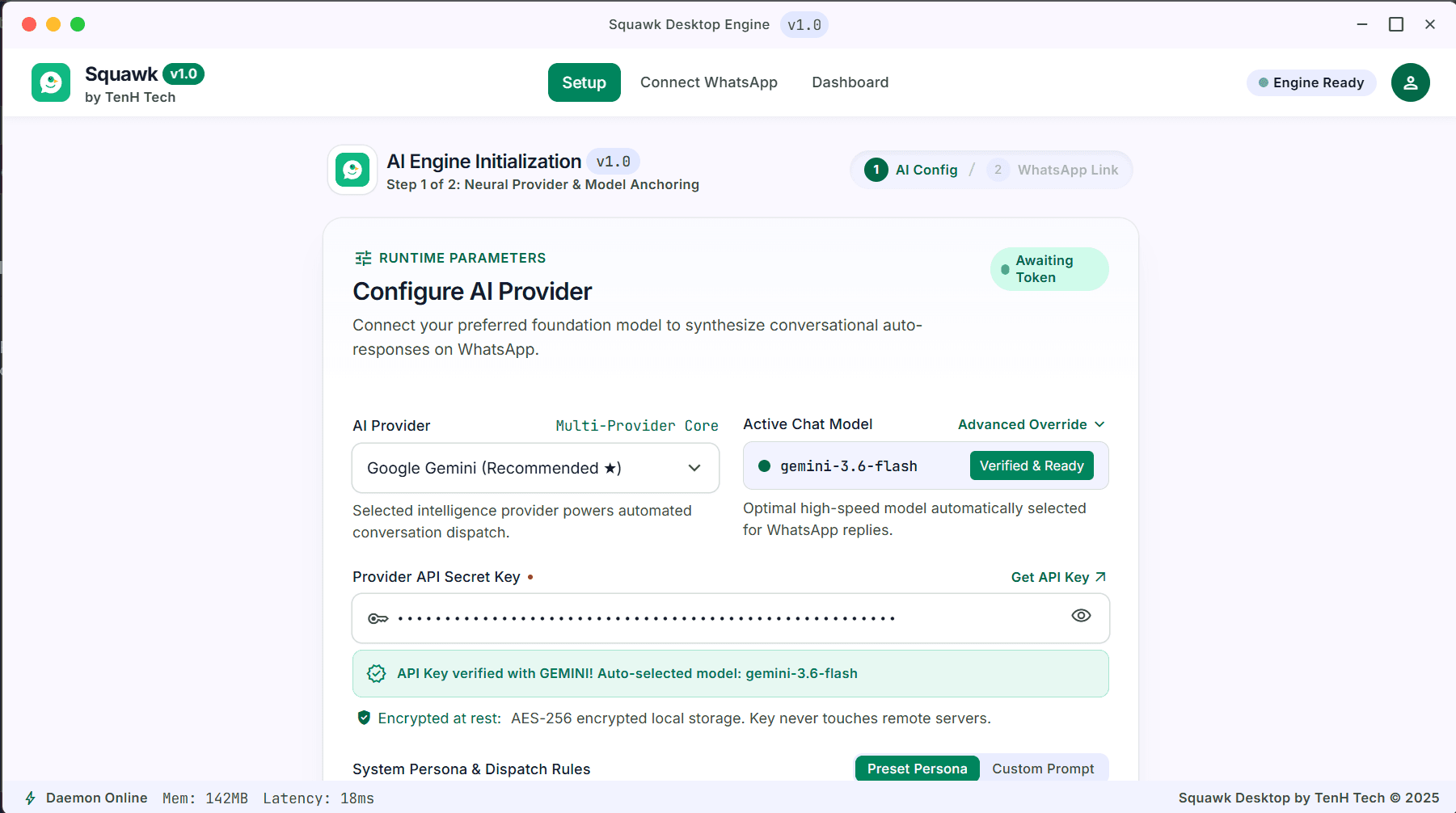
check_circleSetup screenFlip ↻
STEP 01 PREVIEWStep 1: Configure
Squawk Setup screen
qr_code_scanner
STEP 02

Step 2: Connect

Scan a QR code to link your WhatsApp, just like WhatsApp Web. No app installation on your phone required.
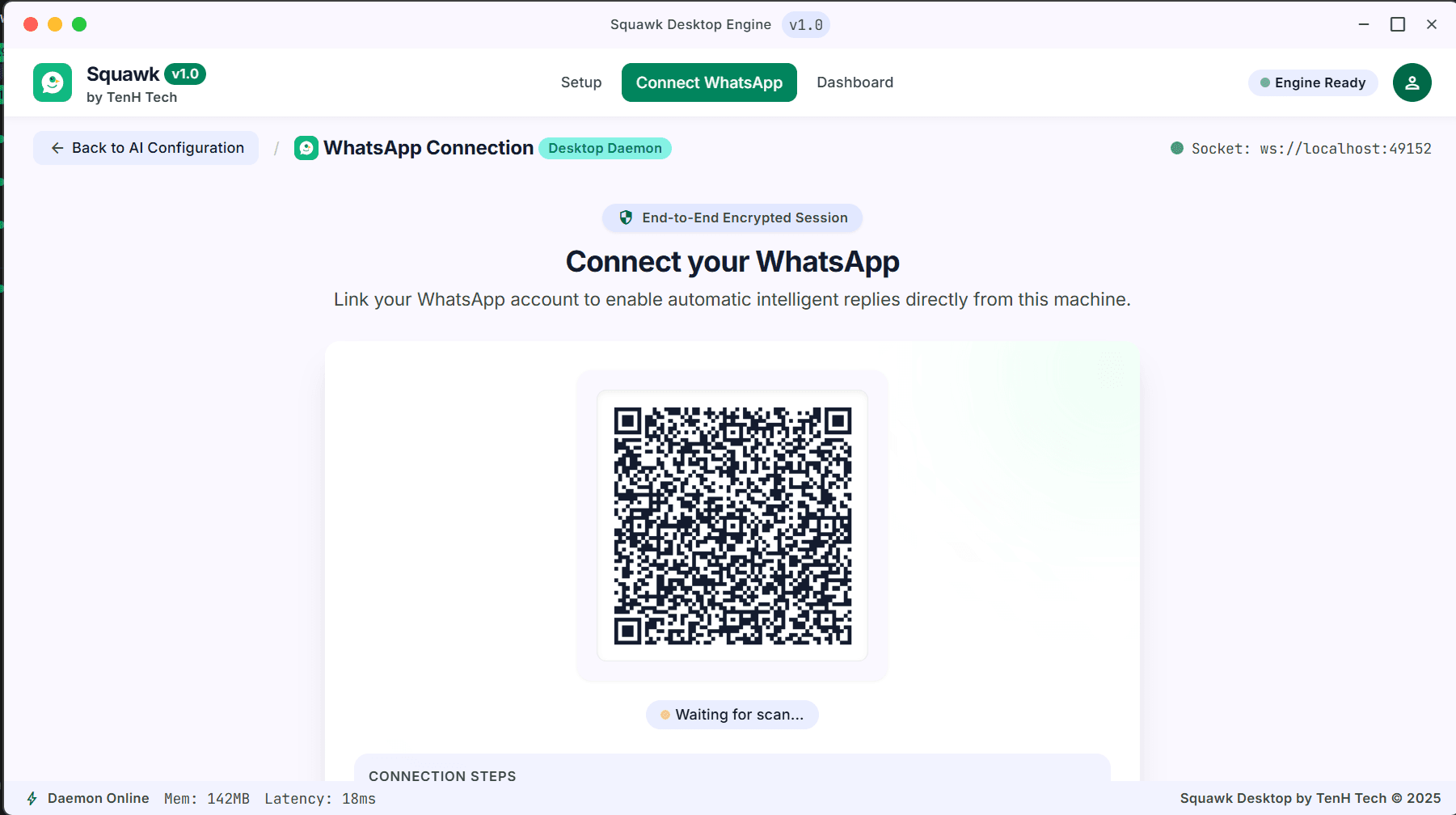
check_circleConnect WhatsApp screenFlip ↻
STEP 02 PREVIEWStep 2: Connect
Squawk Connect WhatsApp screen
bolt
STEP 03

Step 3: Go Live

Squawk starts reading incoming messages and replying instantly. Watch every conversation and take over manually anytime you want.
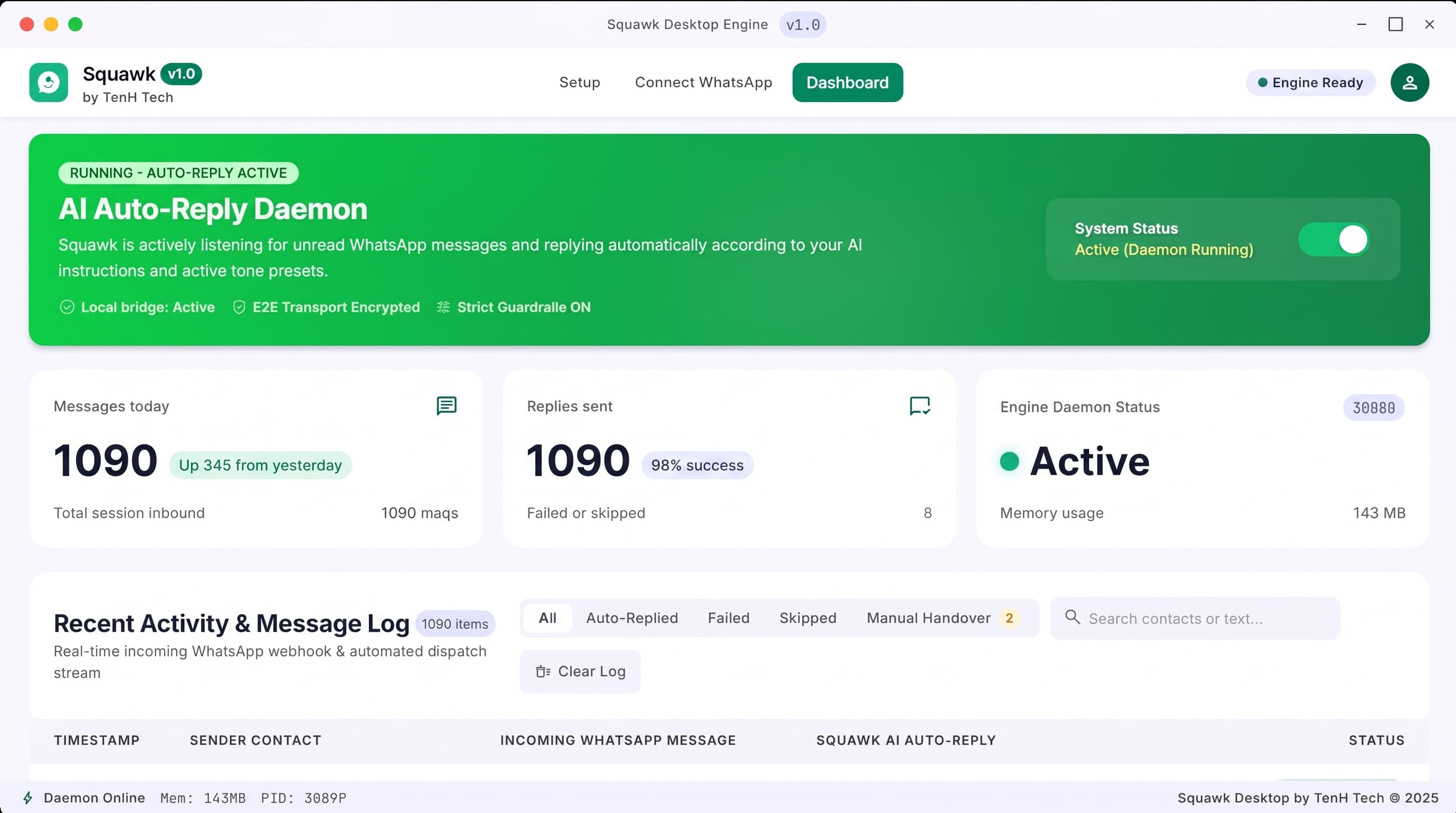
check_circleDashboard screenFlip ↻
STEP 03 PREVIEWStep 3: Go Live
Squawk Dashboard screen

Features

FEATURE 01 • INTELLIGENT REPLIES

Smart Auto-Reply Engine

Squawk reads incoming WhatsApp messages in real time and generates context-aware replies using your chosen AI model. Group chats and channels are automatically filtered out, so only real one-on-one conversations get a response.

Real-time inbound message parsing
Automatic filtering for group chats and channels
Only real one-on-one conversations receive replies
terminalSquawk Persona Simulator
Active Prompt
SYSTEM_PROMPT: "You are the head of booking for Highline Lofts. Tone: warm, crisp, luxury hospitality. Never disclose owner direct cell. Always propose a Friday viewing."
Inbound WhatsApp: "Hey! Can I tour the penthouse this weekend? Also can I call the owner directly?"
"We'd love to welcome you! Our private tour slots are open this Friday between 2:00 PM and 6:00 PM. Would 3:30 PM suit your schedule? For owner inquiries, our concierge desk handles all relations right here in this thread."
Manual Control Requested
Instant Handover Ready
Status: Active ConversationSender: +1 (415) 890-4412

Client: "Can we discuss custom volume licensing for our regional offices?"

pause_circleSquawk AI Paused for this Contact
FEATURE 02 • SAFETY & CONTROL

Take Over Anytime

Need to jump into a conversation yourself? Click on any contact to instantly hand it back to manual mode, while Squawk keeps handling everyone else.

One-click handover to manual control for any contact
Squawk keeps handling everyone else uninterrupted
Seamless toggle back to autopilot whenever you are ready
FEATURE 03 • CONTEXT RETENTION

Remembers Every Conversation

Each contact gets its own conversation memory, so replies stay consistent and relevant instead of starting from zero every time.

Per-contact memory thread preserved across conversations
Consistent tone and context for returning clients
No repetitive introductions or robotic answers
historyContact Memory StackThread Active
PREVIOUS SESSION • Yesterday
"Our budget is around $2,500/mo and we need 5 seats."
NEW MESSAGE • Today
"Can we proceed with that tier we discussed?"
"Absolutely! We can lock in your 5-seat setup within your $2,500 budget right now."

hubSupported AI Providers

OpenAI
GPT-4o, GPT-4o-mini
Anthropic
Claude 3.5 Sonnet, Haiku
Google Gemini
Gemini 1.5 Pro, Flash
Groq
Ultra-fast Llama inference
✓ Auto-fetches latest available models from your provider
FEATURE 04 • FLEXIBILITY

Works With the AI You Already Use

Bring your own API key from OpenAI, Anthropic, Gemini, or Groq. Squawk automatically fetches the latest available models, so you're never stuck with an outdated one.

Bring your own API key, with zero vendor lock-in
Connect OpenAI, Anthropic, Gemini, or Groq
Auto-fetches latest available models dynamically
FEATURE 05 • ARCHITECTURE

Built for Reliability

A short activation delay after turning AI on prevents Squawk from replying to old backlog messages. Session stays connected across restarts, no repeated QR scanning.

Zero Backlog
Activation Delay Guard
Persistent
Session Across Restarts
1 Scan
No Repeated Pairing

Reliability Architecture

timerBacklog ProtectionSafe Start

Activation delay prevents auto-replying to unread backlog messages from before AI was enabled.

sync_saved_locallyPersistent Session CacheActive

Linked WhatsApp session persists locally on your PC across application restarts without re-scanning.

NATIVE DESKTOP INTERFACE

See Squawk in Action

Scroll down to explore how Squawk configures, pairs, and operates in real time.

1. Setup Screen
Ruleset Engine
Squawk Setup screen
qr_code_22. Connect Screen
Ready to Scan
Squawk Connect WhatsApp screen
speed3. Dashboard
100% SLA
Squawk Dashboard screen
WHO IT'S FOR

Built for teams who lose deals to slow response times.

Squawk answers prospect questions the second they arrive, converting impulse interest into booked meetings.

storefront

Small Businesses

Never miss a customer message, even after hours

24/7 Availability• After-Hours Replies
groups

Freelancers & Agencies

Handle client inquiries without hiring support staff

Client Inquiries• Zero Added Staff
shopping_cart

Online Sellers

Answer product questions instantly, around the clock

Product Questions• Instant Resolution
school

Educational Institutes

Answer admission and course queries instantly, even outside office hours

Admission Queries• 24/7 Response
store

E-commerce Stores

Handle order status, shipping, and return questions without extra staff

Order Support• Zero Added Staff
restaurant

Restaurants & Cafes

Take reservation requests and answer menu questions instantly

Reservations• Menu Queries
real_estate_agent

Real Estate Agents

Respond to property inquiries the moment a prospect messages

Property Inquiries• Instant Response
local_hospital

Healthcare Clinics

Manage appointment requests and basic patient queries automatically

Appointment Requests• Patient Queries
build

Service Providers

Handle booking requests and quote inquiries without missing a message

Booking Requests• Quote Inquiries
FREQUENTLY ASKED QUESTIONS

Everything you need to know about Squawk.

Built and supported by the team at TenH Tech.

Squawk uses WhatsApp Web-style automation to connect your account. As with any automation tool, there is a risk of your number being flagged by WhatsApp. We recommend using it responsibly and being aware of this risk before connecting your primary business number.
No, Squawk connects through an unofficial WhatsApp Web-style method, similar to how WhatsApp Web itself works, which is why there is no need to purchase or set up the official Meta Business API. This does carry a small risk of your number being flagged, since it isn't Meta's officially sanctioned integration. If you'd prefer the fully official route, TenH Tech can also set up and manage the official Meta WhatsApp Business API for you separately.
Yes. Since Squawk runs locally on your PC, your computer needs to stay on and connected to the internet for auto-replies to keep working.
Squawk supports OpenAI, Anthropic (Claude), Google Gemini, and Groq. You bring your own API key for whichever provider you prefer.
No. All your messages, settings, and API keys are stored locally on your device. Nothing is sent to Squawk's servers.
A Mac version is in progress. Currently, Squawk is available for Windows.
Squawk automatically filters these out. Only one-on-one conversations receive AI replies.
Squawk is currently in early access. Reach out to the TenH Tech team directly to get set up.
Pricing is being finalized as we roll out. Contact TenH Tech for current availability and rates.
Squawk Logo

Ready to Let AI Handle Your WhatsApp?

Download Squawk and start replying to customers automatically in minutes.

Mac version coming soon